OAuth for MCP Servers on Neon: 4 AI Clients Connect Without DCR
We replaced the static bearer token on our Neon MCP server with OAuth 2.1 from Neon Auth, then connected real MCP clients to it. With Client ID Metadata Documents on and dynamic client registration (DCR) off, Claude Code 2.1.327, Codex CLI 0.167.0, a Claude.ai custom connector and a ChatGPT custom MCP plugin all signed in and called tools. MCP Inspector 2.16.0 with its defaults did not connect, because it registers itself with DCR. It connected when we gave it a metadata document URL, and also when we turned DCR on.
On the server, the OAuth part is two imports and two calls on top of the same contact tools from our static-token version. The rest of the work is two web pages: login and consent. Neon does not host them for you, and the consent page is where the user decides whether to trust a client. We also ran 20 checks against the deployed server. One of them shows why your resource server must check the token issuer on Neon: a token from a child branch has a valid signature on the parent.
TL;DR
- Neon Auth's OAuth provider plugin turns the auth server in your Neon project into an OAuth 2.1 authorization server. With
@neon/oauth, the MCP side iscreateMcpAuth()plus one Hono middleware. - You must host a login page and a consent page. We served both from the same Neon Function as the MCP server, so the whole thing is one function, one Postgres branch and one auth server.
- Claude Code and Codex identify themselves with Client ID Metadata Documents (CIMD), and both connected with DCR off. MCP Inspector uses DCR unless you pass
--client-metadata-url. - Scopes are fixed:
openid,profile,email,offline_access. Claude Code and MCP Inspector sent noscopeparameter, and the consent screen then asked for all four. You cannot define a scope such ascontacts:write. - Access tokens are EdDSA JWTs with a 1-hour lifetime. Neon Auth refused to revoke one ("JWT access tokens are self-contained and cannot be revoked server-side"), and the token still worked at
/mcpright after we revoked its refresh token. - All branches of a project share signing keys. A token from a
previewbranch passed a verifier that checked only the signature and audience, with the same user ID as onmain.@neon/oauthrefused it, because it checksiss. - Claude.ai and ChatGPT also used CIMD, with their callbacks on
claude.aiandchatgpt.com, and worked with DCR off.
Prerequisites
- A Neon project in a region with Neon Functions (we used
aws-us-east-2) and the Neon CLI (npm i -D neon) - Node.js 20.19 or later
- The companion repo
- An MCP client that supports OAuth: Claude Code, Codex CLI, MCP Inspector, or the MCP TypeScript SDK
What changed from the static token
In July we built a Postgres-backed MCP server on Neon Functions with an optional shared token: with MCP_TOKEN set, a request without the matching bearer token got a 401, and with it unset the demo was open. A shared token works, but everyone who has it is the same user, it never expires, and you rotate it by editing every client config.
| Static token (July) | OAuth with Neon Auth (this post) | |
|---|---|---|
| Auth code in the server | 8 lines of Hono middleware | 2 imports, createMcpAuth() and app.use(honoMcp(...)) |
| Extra code | none | a login page and a consent page, 146 lines of HTML and script |
| Setup | deploy, set MCP_TOKEN |
deploy twice, add a trusted domain, enable the OAuth server, create users |
| What the user does | pastes a token into a client config | pastes the URL, signs in, presses Allow |
| Who is calling | unknown, one shared identity | each user, from the token's sub |
| Data isolation | none, everyone sees every contact | reads, updates and deletes filter on owner_id = sub; inserts set it from sub |
| Token lifetime | forever | 1-hour access token, 30-day rotating refresh token |
| Stop renewal | rotate the token for everyone | revoke that refresh token; issued access tokens stay valid until they expire |
The function file grew from 173 to 223 lines, plus 146 lines for the pages. About 45 of the function's lines log page views and MCP calls to a table, so we could see which client did what during the tests. You can delete them.
How the flow works
- The client calls
/mcpwith no token. The function answers401withWWW-Authenticate: Bearer ... resource_metadata="<function>/.well-known/oauth-protected-resource/mcp". - That document (RFC 9728) names the branch's Neon Auth URL as the authorization server. The client reads the server metadata from there.
- The client identifies itself. With CIMD, its
client_idis anhttpsURL that serves a JSON document, and Neon Auth fetches it. With DCR, it first registers at/oauth2/register. - Neon Auth sends the browser to your login page, then to your consent page.
- The client gets a code at its redirect URI, swaps it for tokens with the PKCE verifier, and calls
/mcpwith the access token.
This is the protected resource metadata the deployed server returned, from results/metadata/ in the repo:
{
  "resource": "https://br-winter-lab-bd56czl7-contacts.compute.c-8.us-east-2.aws.neon.tech/mcp",
  "authorization_servers": [
    "https://ep-long-butterfly-bdogtbqs.neonauth.c-8.us-east-2.aws.neon.tech/neondb/auth"
  ]
}
The authorization server metadata lists code_challenge_methods_supported: ["S256"], client_id_metadata_document_supported: true and the four scopes. With DCR off it has no registration_endpoint, which is how clients learn that DCR is not available.
The server
The MCP part changes very little. The difference is that the server is created per request, so the tools close over the user ID from the verified token. The user ID never comes from tool input. This is an abbreviated version of functions/contacts/index.ts; the pool setup, the other three tools and the logging are in the repo:
import { Hono } from 'hono';
import { McpServer } from '@modelcontextprotocol/sdk/server/mcp.js';
import { WebStandardStreamableHTTPServerTransport } from '@modelcontextprotocol/sdk/server/webStandardStreamableHttp.js';
import { createMcpAuth } from '@neon/oauth/mcp';
import { honoMcp, type McpAuthVariables } from '@neon/oauth/mcp/hono';

// NEON_AUTH_BASE_URL is injected by Neon. MCP_RESOURCE is this function's own /mcp URL.
const mcpAuth = createMcpAuth({
  baseUrl: process.env.NEON_AUTH_BASE_URL!,
  resource: process.env.MCP_RESOURCE!,
});

function createServer(ownerId: string) {
  const server = new McpServer({ name: 'neon-contacts', version: '2.0.0' });
  server.registerTool(
    'search_contacts',
    {
      title: 'Search contacts',
      description: 'Search your contacts by name, email, company or notes.',
      inputSchema: {
        query: z.string().trim().min(1).optional(),
        limit: z.number().int().positive().max(100).default(20),
      },
      annotations: { readOnlyHint: true },
    },
    async ({ query, limit }) => {
      const { rows } = await pool.query(
        `SELECT id, name, email, company, notes, created_at FROM contacts
          WHERE owner_id = $1
            AND ($2::text IS NULL OR name ILIKE $2 OR email ILIKE $2 OR company ILIKE $2 OR notes ILIKE $2)
          ORDER BY name LIMIT $3`,
        [ownerId, query ? `%${query}%` : null, limit]
      );
      return asText({ count: rows.length, contacts: rows });
    }
  );
  // create_contact sets owner_id from ownerId; update_contact and delete_contact filter on it
  return server;
}

const app = new Hono<McpAuthVariables>();

// Serves the protected resource metadata and returns 401 with a challenge
// unless the token's signature, iss and aud are all valid.
app.use(honoMcp(mcpAuth, { path: '/mcp' }));

app.all('/mcp', async (c) => {
  const server = createServer(c.get('auth').sub);
  const transport = new WebStandardStreamableHTTPServerTransport({ sessionIdGenerator: undefined });
  await server.connect(transport);
  return transport.handleRequest(c.req.raw, { authInfo: c.get('authInfo') });
});

export default app;
createMcpAuth() checks three things on each token: the EdDSA signature against the branch's JWKS, iss equal to your branch's Auth URL, and your /mcp URL in aud. We test each of these below. The contacts table has an owner_id text NOT NULL column that stores the token's sub. That is the ID of the user row in the neon_auth schema, in the same Lakebase Postgres database, which is the point we made in the Neon Auth post.
db/schema.sql creates the demo tables in a new, empty database. If you upgrade the July database instead, you need a migration that adds owner_id, assigns the existing shared contacts to users you choose, and only then sets NOT NULL and adds the index.
The login and consent pages
Neon Auth does not ship these pages. You host both, on an https origin you add as a trusted domain. We put them on the same function, at /auth/sign-in and /auth/consent, so the function URL is the trusted domain. Neon accepted a Neon Function URL for this.
Each page gets the authorization request as a signed query string and sends it back unchanged as oauth_query:
- The login page posts the email and password to
<issuer>/sign-in/emailwithoauth_query. Neon Auth answers with the next URL, usually the consent page. - The consent page loads the client name from
<issuer>/oauth2/public-client, shows what the user is approving, and posts{ accept, oauth_query }to<issuer>/oauth2/consent. The answer is the client's redirect URI with a code.
The function and the Neon Auth host are different origins under neon.tech. neon.tech is not on the Public Suffix List, so the two hosts are the same site. Our page script calls Neon Auth with credentials: 'include', and Neon Auth allows the trusted page origin, so the session cookie goes with those calls. If you move the pages to your own domain, the hosts are no longer the same site; the Next.js setup in Neon's guide proxies the auth calls through the app instead.
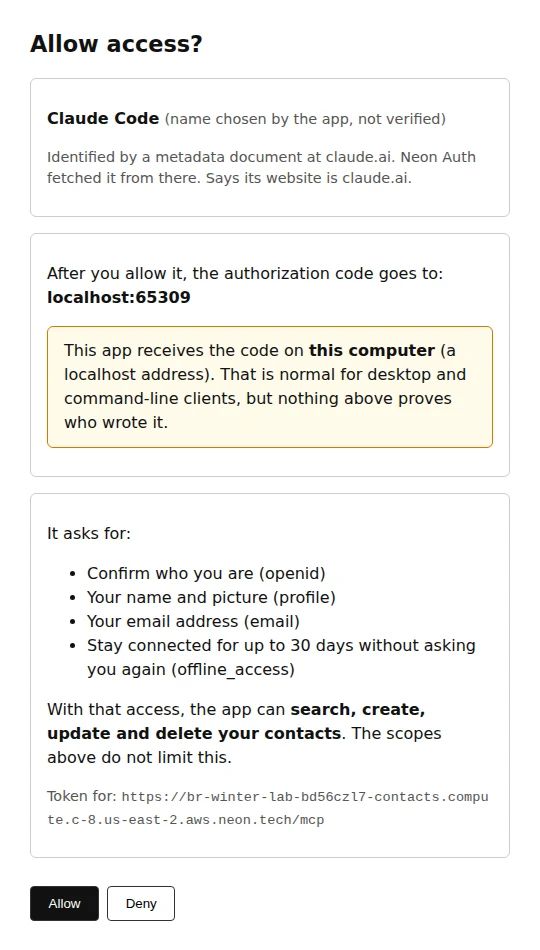
The consent page is where you decide what the user learns about the client. Ours shows:
- the client name, labelled as chosen by the app and not verified
- how the client was identified: "a metadata document at
claude.ai", or a random client ID for a self-registered client - the host that receives the authorization code, from
redirect_uri - a warning when that host is
localhost - each scope in plain words, and the resource the token is for
- what the token can do in this app: search, create, update and delete your contacts, which the scopes do not limit
It also sends Content-Security-Policy: frame-ancestors 'none' so another site cannot frame it, and it renders every value with textContent, because the client name and the query are attacker-controlled input.
This is the consent screen Claude Code got:
Turn it on
The function URL is the MCP resource, and you only know it after the first deploy. So you deploy twice:
npm install
npx neon link --project-id <your-project-id>
npx neon deploy                                   # neon.ts has auth: true
psql "$DATABASE_URL" -f db/schema.sql
npx neon functions deploy contacts --src functions/contacts
F=https://<branch_id>-contacts.compute.<cell>.aws.neon.tech
npx neon functions deploy contacts --src functions/contacts --env "MCP_RESOURCE=$F/mcp"

npx neon neon-auth domain add "$F"
npx neon neon-auth config oauth-server update --enabled \
  --login-page "$F/auth/sign-in" \
  --consent-page "$F/auth/consent" \
  --mcp-resource "$F/mcp" \
  --mcp-client-id-metadata-documents
The demo has no sign-up page, so create a user before you connect a client: POST <NEON_AUTH_BASE_URL>/sign-up/email with Origin: $F and a JSON body with email, password and name. The README has the command.
neon neon-auth config oauth-server get shows the result. This is our branch after the tests, with the second resource we added for the audience check:
OAuth server configuration
  Enabled:          true
  Login Page:       https://br-winter-lab-bd56czl7-contacts.compute.c-8.us-east-2.aws.neon.tech/auth/sign-in
  Consent Page:     https://br-winter-lab-bd56czl7-contacts.compute.c-8.us-east-2.aws.neon.tech/auth/consent
  MCP Resource:     https://br-winter-lab-bd56czl7-contacts.compute.c-8.us-east-2.aws.neon.tech/mcp
  MCP CIMD:         true
  MCP Dynamic Reg:  false
  Resources:        https://reports.example.com/api
DCR is off by default on a newly configured provider, and these commands do not change it. Neon's docs say branches configured before October 2026 may have relied on DCR being on, so check MCP Dynamic Reg on an older project. The CLI has no flag for DCR. To set it, PATCH the OAuth provider endpoint with "mcp": { "resource": "...", "dynamic_registration": false } (or true).
Neon's guide notes that a new deployment can take a few minutes to serve traffic. Wait until resource in the protected resource metadata matches your MCP_RESOURCE before you connect a client.
The client matrix
We tested every client we could run on our own machines. Claude Code and Codex ran on a Raspberry Pi. MCP Inspector, the scripted client and a headless Chromium ran on a small Linux server. For the browser step, a script opened the authorize URL in headless Chromium, signed in on our login page, read the consent page and pressed Allow. Claude Code and Codex ran on a different machine than the browser, so we used their --no-browser login and pasted the redirect URL back, which both CLIs support. We did not test their usual flow, where the browser sends the code to the CLI's local listener. Inspector ran next to the browser, which called its local listener directly. The scripted client caught the redirect in the browser and passed the code to the MCP SDK.
| Client | How it identified itself | DCR off (default) | DCR on |
|---|---|---|---|
| Claude Code 2.1.327 | CIMD, https://claude.ai/oauth/claude-code-client-metadata |
Connected, 2 tool calls | not tested |
| Codex CLI 0.167.0 | CIMD, https://chatgpt.com/oauth/codex/client.json |
Connected, 2 tool calls | not tested |
| MCP Inspector CLI 2.16.0, defaults | DCR | Failed: "does not support dynamic client registration" | Connected, 1 tool call |
MCP Inspector CLI 2.16.0, --client-metadata-url |
CIMD, a document we hosted | Connected, listed tools | not tested |
| Our scripted client, MCP TypeScript SDK 1.32.2 | CIMD or DCR, by flag | CIMD connected; DCR failed as expected | DCR connected |
| Claude.ai custom connector (a person, in a browser) | CIMD, https://claude.ai/oauth/mcp-oauth-client-metadata |
Connected, 2 tool calls | not tested |
| ChatGPT custom MCP plugin (a person, in a browser) | CIMD, https://chatgpt.com/oauth/client.json |
Connected, listed tools, 1 tool call | not tested |
Claude Code, with a --no-browser login:
Codex works the same way, with codex mcp add neon-contacts --url <url> and codex mcp login neon-contacts --no-browser. Its log shows the two tool calls:
mcp: neon-contacts/search_contacts started
mcp: neon-contacts/search_contacts (completed)
mcp: neon-contacts/create_contact started
mcp: neon-contacts/create_contact (completed)
Codes and states in these transcripts are redacted. Both CLIs signed in as the same demo user, so Codex's search_contacts returned the contact Claude Code had created a few minutes earlier, and not the contact a second user had created. The rows belong to the user, not to the client.
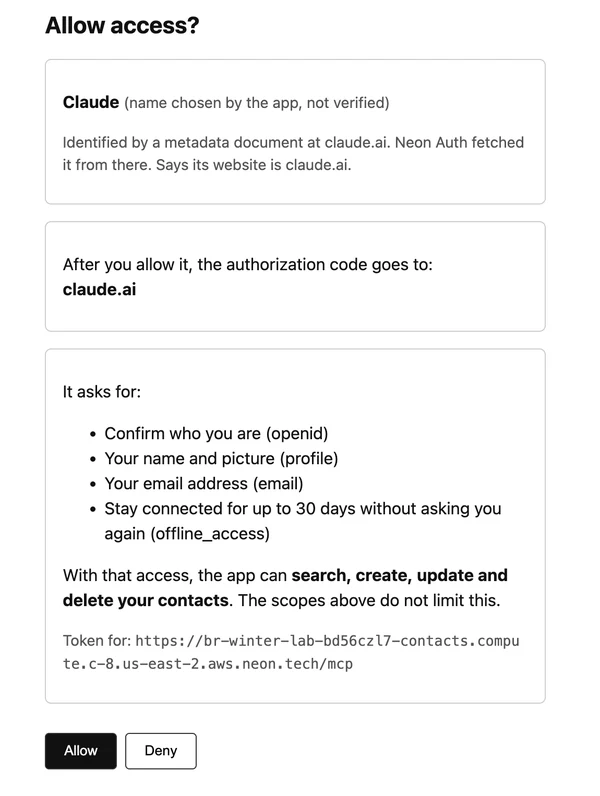
The Claude.ai connector was the first of two tests a person ran by hand, in a desktop browser, with DCR still off. They added the function URL as a custom connector, signed in on our login page and pressed Allow. Our log shows the client ID https://claude.ai/oauth/mcp-oauth-client-metadata, the callback https://claude.ai/api/mcp/auth_callback, and then MCP calls with the user agent Claude-User: tools/list, one create_contact and one search_contacts that found the new contact. Because the callback is an https URL on claude.ai and not localhost, the consent page names that host and shows no localhost warning:
ChatGPT was the second test a person ran by hand, about 25 minutes later, again with DCR off. In the chatgpt.com web UI the path was Plugins > Add plugin > Add custom MCP server, with the function URL and OAuth as the authentication. The dialog has an "Advanced OAuth settings" section for reviewing the discovered settings, but the defaults worked, and the account did not need a developer mode switch. Our log shows the client ID https://chatgpt.com/oauth/client.json, the callback https://chatgpt.com/connector_platform_oauth_redirect, and then MCP calls with the user agent openai-mcp/1.0.0: initialize, tools/list and one search_contacts. There is no login page row, because the browser still had a Neon Auth session from the Claude.ai test, so Neon Auth went straight to the consent page. Registration and token requests go to Neon Auth, not to our function, so our log cannot show them; the URL client ID shows that ChatGPT used CIMD.
Three details from the matrix are worth knowing before you choose settings:
- Every third-party client that connected used CIMD. Their
client_idis a URL on their vendor's domain, so Neon Auth fetched the document fromclaude.aiandchatgpt.com, and our consent page could say so. None of them needed DCR. - Loopback ports can change between logins. Our runs used
localhost:57501andlocalhost:65309for Claude Code and127.0.0.1:40273for Codex. For CIMD clients, Neon Auth matches a loopback redirect URI on any port, so this works. A managed client you create yourself has to match exactly, port included. - Inspector's defaults need DCR. Without
--client-metadata-url, Inspector 2.16.0 tried to register and stopped with "Incompatible auth server: does not support dynamic client registration". With a metadata URL, it connected. If you leave DCR off, users of clients that only do DCR will see this error.
What the clients asked for
We compared each client's authorize URL with the scopes Neon Auth passed on to our consent page. Our scripted client requested openid offline_access: openid for identity and offline_access for a refresh token. Claude Code and MCP Inspector sent no scope parameter, and the consent page received all four scopes, so the user was asked for their name, picture, email and 30 days of offline access. Codex requested all four itself. The Claude.ai and ChatGPT consent pages also received all four; we did not capture their authorize URLs, so we cannot say whether they asked for them.
The tools need neither profile nor email. But scopes on Neon Auth are fixed, and the server cannot define narrower ones such as contacts:read. Every client that gets a token in this demo can search, create, update and delete the user's contacts. If you need read-only users or read-only clients, keep that rule in your own code, for example as a role column next to owner_id.
Security: what we checked
scripts/attacks.ts makes 20 assertions against the deployed server: expected HTTP statuses, response values, and the OAuth error code on refresh failures. A section that throws counts as a failed check. All 20 passed. The script also records one observation that is not counted: what Neon Auth says when you try to revoke an access token.
| Check | Expected | Got |
|---|---|---|
No Authorization header |
401 with resource_metadata |
401 with resource_metadata |
| Random string as token | 401 | 401 |
Correct iss and aud, signed with an attacker key |
401 | 401 |
| Real token for another resource on the same branch | 401 | 401 |
| Real token from a child branch | 401 | 401 |
Same child-branch token, verifier with no iss check |
accepted | accepted, same sub as on main |
| Bob updates, deletes or searches Alice's contact | not found / 0 rows | not found / 0 rows |
| Reuse a rotated refresh token at once | 200, same new token | 200, same new token |
| Reuse it after 35 seconds | 400 invalid_grant |
400 invalid_grant |
| Then use the token the first refresh returned | 400 invalid_grant |
400 invalid_grant |
| Revoke the refresh token, then refresh | 400 invalid_grant |
400 invalid_grant |
Call /mcp with the access token right after that |
200 | 200 |
| Register a client while DCR is off | 403 | 403 |
Tokens from another branch
This is the check that is specific to Neon. Neon's docs say it plainly: all branches of a project share the same signing keys, and only the issuer differs. A child branch also copies its parent's OAuth settings, including the MCP resource URL, so its tokens carry the parent's /mcp URL in aud.
We created a preview branch. Its OAuth config still pointed mcp.resource at the main function. We signed in as Alice against the preview branch's Auth URL, calling the auth endpoints directly (our pages are wired to the main issuer), and got a token. The main server refused it with 401, because iss was the preview branch. Then we checked the same token with jose, using the main JWKS and the right audience but no issuer:
// The broken verifier: signature and audience, no issuer.
await jwtVerify(childBranchToken, mainJwks, { audience: MCP_URL, algorithms: ['EdDSA'] });
// -> accepted, and payload.sub is Alice's user ID on main
It accepted the token, and the sub was the same as Alice's on main, because the branch copied the neon_auth tables too. So without an issuer check, a token from another branch of the same project, with an audience that matches production, can read and change that user's rows on production. If a preview branch has weaker account or database controls than main, that is a real path in. @neon/oauth checks iss by default. If you write your own verifier, pass issuer to jwtVerify.
If you do want a working MCP server on a child branch, more than the resource URL has to change. Deploy the function on the child with the child's MCP_RESOURCE, point --mcp-resource, the login page and the consent page at the child's function, and add that origin as a trusted domain on the child. Its pages then call the child's issuer.
Revocation and token lifetime
Access tokens are EdDSA JWTs with a 3,600-second lifetime, and the server verifies them locally with the JWKS. That is fast, but the server does not see revocations. We revoked a refresh token, and the next refresh with it failed with invalid_grant. When we sent the access token to the revocation endpoint, Neon Auth answered 400 unsupported_token_type with "JWT access tokens are self-contained and cannot be revoked server-side". The access token still worked at /mcp right after that, and local JWT verification will keep accepting it until it expires.
So revoking a refresh token stops renewal for that grant. It does not end a token that was already issued, and it does not stop the user from signing in again. Token lifetimes are not configurable on Neon Auth. If you need to cut a user off at once, keep a disabled flag in your own database and check it on each tool call.
Refresh rotation and the 30-second window
Every refresh returns a new refresh token. With an MCP resource set, Neon's docs describe a 30-second reuse window, so a client that sends the same refresh request twice gets the same answer. Our sequential test matched that: reusing the old refresh token at once returned 200 and the same new refresh token as the first call. After 35 seconds, the old refresh token failed with invalid_grant, and the token the first refresh had returned also failed with invalid_grant. A client with a bug in its token storage loses its refresh token this way and needs a new authorization. The user's browser session and stored consent may make that quick.
Open DCR and consent phishing
With DCR on, anyone can register a client with a name they choose and any redirect URIs that pass Neon's checks, including an https callback on their own server. We registered a client named "Claude" with the redirect URI https://attacker.example/cb. It reached our consent screen:
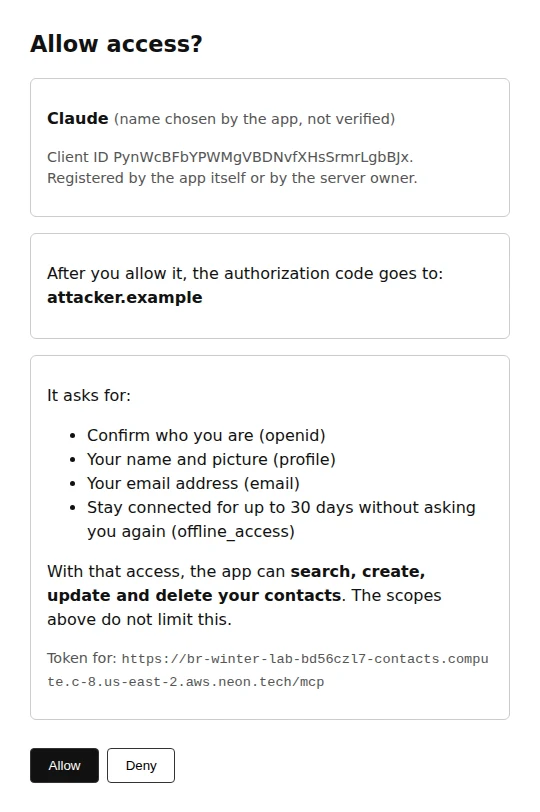
This is consent phishing. The attacker starts the flow with their own client, so PKCE does not help: they hold the verifier. If the user presses Allow, the attacker's server gets a code and then tokens for that user. The name says "Claude". That name is self-chosen. The useful facts are the random client ID, the host that gets the code, the scopes, the resource and what the app can do. A consent page that shows only the client name would look like the real Claude Code screen above.
CIMD does not stop an attacker from choosing a name either. We hosted a document that called itself "ChatGPT", and Neon Auth accepted it. But the client ID is then a URL, so the consent page can show where the document lives, which was our test host and not chatgpt.com. That tells the user where the metadata came from. It does not prove which program is using a public client ID.
Turning DCR off later does not remove clients that registered while it was on. Neon's docs say so, and we saw it: after we turned DCR off, the "Claude" client above still reached the consent screen.
So our recommendation:
- Leave DCR off unless a client you need cannot use CIMD. Claude Code and Codex did not need it.
- On the consent page, show the redirect host, how the client was identified and what the token can do in your app, not only the name.
- Warn when the redirect is
localhost. That is normal for CLI clients, but any program on the machine could be the client. - If only clients you approve should connect, turn off CIMD and DCR, disable or delete any self-registered clients that are still there, and create managed clients. Tokens that were already issued stay valid until they expire.
The consent screen is the last check for the user, not the only one. Keeping DCR off, limiting what each user can do in your own code, and the issuer check above all reduce what a bad client can get. The MCP threat model is also wider than OAuth: see the MCP design flaw post for the client side, and the authentication failures chapter of our OWASP guide for the general rules.
Limits we hit
- You host the pages. No default UI. Ours is 146 lines with no framework.
- Scopes and lifetimes are fixed. Four scopes, 1-hour access tokens, 30-day refresh tokens.
- CIMD documents cannot live on a Neon domain.
client_idURLs onneon.techorneon.comare refused, so if you build a client, host its document somewhere else. We used a temporary Cloudflare tunnel. - Self-onboarding is for the MCP resource only. Other APIs need managed clients.
- Branches need their own setup. A new branch keeps pointing at the parent's function and pages until you change them.
- New deployments take a moment. Check the protected resource metadata before you connect a client.
What we could not test
- Cursor and other desktop clients. Not tested.
- Interactive browsers. Our browser step was headless Chromium on Linux, and the CLI runs used the paste-back flow. Apart from the Claude.ai and ChatGPT runs by a person, we did not test interactive logins, Safari, or a custom domain.
- Load. One user at a time, a handful of calls each.
The repo
The README starts with the deploy commands. results/ has the client transcripts, the metadata documents, the consent screenshots and attacks.json. If you are deciding whether a CLI or an MCP server is the right interface in the first place, see the CLI vs MCP comparison.
Wrapping up
Moving an MCP server on Neon from a shared token to OAuth took one Neon Auth setting, two calls from @neon/oauth in the function, an owner check on every contact query and two small web pages. In return, each user signs in with their own account, every tool call carries their ID, and their rows stay theirs. The default settings were the right ones for the clients we ran: Claude Code, Codex, Claude.ai and ChatGPT connected with CIMD and no dynamic registration.
The parts that need your attention are not in the token flow. They are the consent page, where a user decides whether a client with a self-chosen name gets in, and the issuer check, which on Neon separates main from every branch that shares its keys.
Try it hands-on
Run the commands from this article in the browser. Nothing to install.
OAuth/OIDC Flow Simulator
Visualize OAuth 2.0 and OpenID Connect flows with an interactive simulator. Learn authorization code + PKCE, state, nonce, redirect URI checks, ID tokens, access tokens, refresh tokens, scopes, UserInfo, and common auth failure modes.
PostgreSQL Terminal Simulator
Practice the psql tool and Postgres engine in an interactive browser terminal. Explore with meta-commands, read real EXPLAIN plans, add an index to turn a sequential scan into a bitmap index scan, and use BEGIN and ROLLBACK to make changes safe, all against a small e-commerce database with verified PostgreSQL output.
We earn commissions when you shop through the links below.


Bitrise
Managed runners for GitHub Actions
Bitrise Build Hub runs your GitHub Actions jobs on M4 Macs and AMD Linux machines. Change runs-on and keep your workflows, secrets and logs on GitHub.


Atomsized
AWS platform engineering and GitOps
Design and automation for reliable AWS and Kubernetes platforms, safer delivery workflows, and preview and UAT environments your engineers can understand and own.

DigitalOcean
Cloud infrastructure for developers
Simple, reliable cloud computing designed for developers

DevDojo
Developer community & tools
Join a community of developers sharing knowledge and tools

SMTPfast
Developer-first email API
Send transactional and marketing email through a clean REST API. Detailed logs, webhooks, and embeddable signup forms in one dashboard.

QuizAPI
Developer-first quiz platform
Build, generate, and embed quizzes with a powerful REST API. AI-powered question generation and live multiplayer.
Want to support DevOps Daily and reach thousands of developers?
Become a SponsorFound an issue?
Related Posts
Also worth your time on this topic
A Postgres-Backed MCP Server in ~20 Lines
Most of what an MCP server does is run database queries on behalf of an AI agent. So I put one right next to the database. Here is a Postgres-backed MCP server built on Neon Functions, deployed onto a database branch, with the code, a live client test, and the repo.
Database Backup and Recovery
Describe database backup strategies and how you would design a recovery plan for production databases.
mid
Complete Web Server Automation with Ansible
Build a comprehensive Ansible playbook to automate web server deployment, configuration, and security hardening across multiple environments.
75 minutes